Live Feed: See only what matters to you 🔔
You can now filter your Live Feed notifications, and choose whether you'd love to see all or only some of them.
Here are the 4 types of notifications you may choose to display:
🙌 Sharing Activity
Get notified every time an email conversation is shared with you, assigned to you, and when its status is changed to closed.
💬 Notes and @mentions
View instant notifications when you or your team is @mentioned in the internal Email Notes.
✔️ Tracked Emails
See Email Tracking notifications when your recipients open your tracked emails.
🤖 Automation
Stay in the know when your contacts complete a certain stage of your Sequence, or when someone books or cancels a meeting with you.
Please note, you can see up to 90 filtered notifications for each type of notifications, and up to 500 notifications when All types are selected.
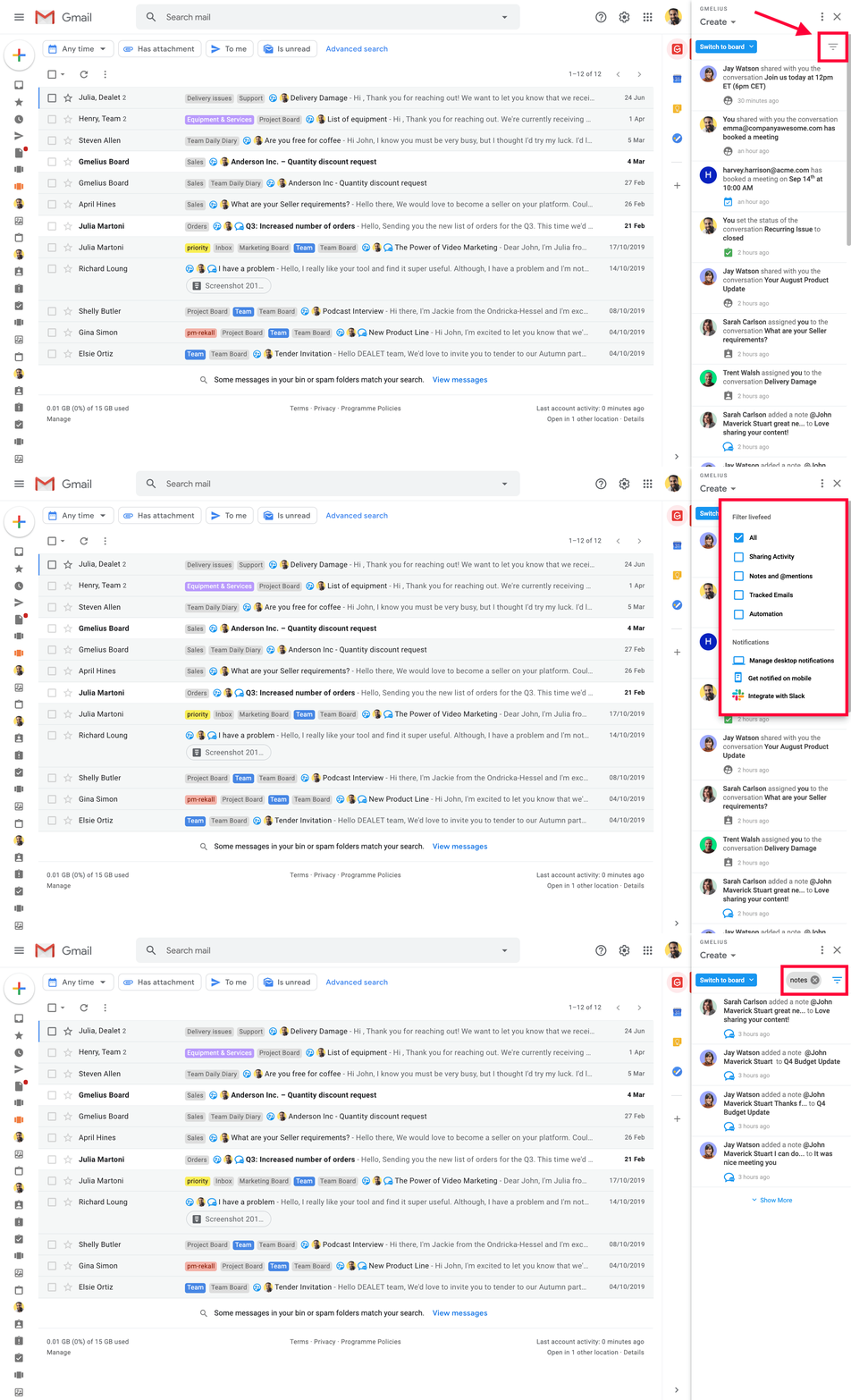
Once you click on the filter icon, you can also personalize and manage your notifications - on the desktop, mobile, and in Slack.
Eager to know more about Gmelius notifications?